
Can Apple’s Vision Pro Make Spatial Computing Mainstream?
In this article, we unpack the technology behind mixed reality, compare leading devices, examine real-world use cases, and analyze whether the Vision Pro era can finally push spatial computing into the mainstream.
Apple’s Vision Pro has transformed “spatial computing” from a buzzword into a serious contender for the next major computing platform. Competing devices from Meta, HTC, and others are accelerating the debate: is mixed reality (MR) the post-smartphone future, or another expensive curiosity like 3D TVs and Google Glass? As tech media and social feeds fill with headset demos in planes, offices, and living rooms, the market is quietly running a live experiment in mainstream adoption.

Vision Pro’s high‑resolution micro‑OLED displays, advanced eye and hand tracking, and deep integration with Apple’s ecosystem position it as a premium reference device for spatial computing. Meanwhile, Meta’s Quest line pushes aggressively on price, gaming, and social experiences. The central question is no longer just “How impressive is the tech?” but “Can people live and work with this, every day?”
Mission Overview: What Is Spatial Computing Trying to Achieve?
Spatial computing refers to computing experiences that understand and respond to the 3D space around you. Instead of apps confined to flat screens, windows and objects are placed in the real world, anchored to walls, desks, and even moving people. The mission is to turn the entire environment into an interactive canvas.
Apple describes Vision Pro as a “spatial computer”, emphasizing that it is not just a VR headset but a general-purpose device for work, entertainment, collaboration, and creativity. Meta, by contrast, tends to talk about the metaverse and social presence—avatars, multiplayer games, and virtual hangouts.
“The fundamental promise of spatial computing is that the world itself becomes your UI. The question is whether we can make that UI comfortable, private, and socially acceptable enough to use all day.” — Fictional synthesis of views common in XR research communities
In broad terms, spatial computing platforms today are chasing three overlapping goals:
- Post-smartphone productivity – multi‑window workspaces, virtual monitors, and 3D collaboration tools.
- Immersive entertainment – cinema‑scale movies, mixed‑reality games, and interactive experiences.
- Professional & industrial workflows – design, training, simulation, remote assistance, and digital twins.
Technology: Under the Hood of Vision Pro and Its Rivals
Vision Pro, Meta Quest 3, and high‑end devices from HTC and others share common building blocks—head‑mounted displays, inside‑out tracking, spatial audio—but they differ dramatically in implementation and trade‑offs.
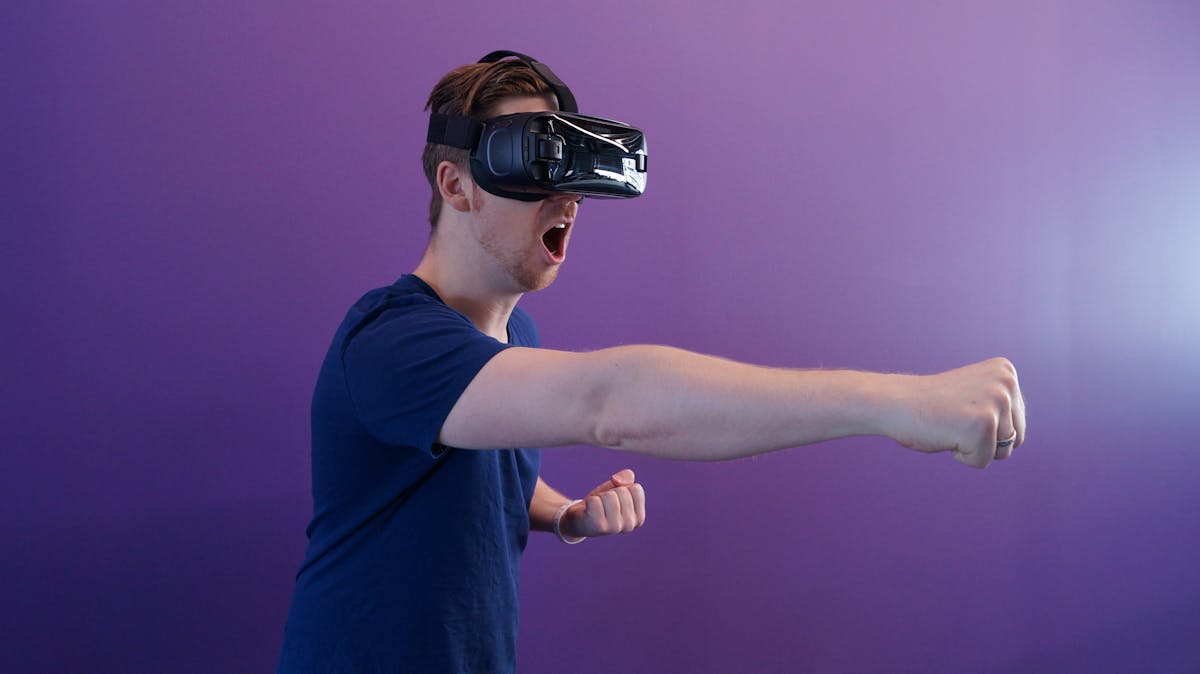
Display and Optics
Vision Pro uses dual micro‑OLED displays with extremely high pixel density, approaching or exceeding 4K per eye. This sharply reduces the “screen door effect” and makes small text legible, which is critical for productivity apps and desktop‑class interfaces.
Meta’s Quest 3 uses lower‑resolution LCD panels with pancake lenses. While not as sharp as Vision Pro, its visual fidelity is more than adequate for gaming, fitness, and casual productivity—at a fraction of the price.
Tracking, Input, and Interaction
Vision Pro’s eye‑tracking and hand‑tracking are its defining interaction features. Users simply look at UI elements and perform subtle pinches to click, scroll, or drag.
- Infrared cameras and LEDs track the user’s gaze with high precision.
- Downward‑facing cameras track hand and finger movements in 3D space.
- Sensors fuse head pose, eye direction, and hand gestures into a cohesive input model.
Meta Quest devices also support hand tracking, but much of their content still assumes physical controllers, which offer tactile buttons, triggers, and haptics suited to gaming. Developers targeting cross‑platform engines like Unity or Unreal often design input schemes that work well with controllers first, then adapt to hand tracking where available.
Passthrough and Mixed Reality
Vision Pro emphasizes video passthrough mixed reality: external cameras capture the real world and render it on the internal displays, enabling 3D content to be composited with your environment. Apple’s color passthrough quality is notably high, improving text readability and reducing motion blur versus older headsets.
Quest 3 also offers color passthrough MR, though with more noise and artifacts in low light. Despite these limitations, it is good enough to support mixed‑reality games, room‑scale experiences, and productivity scenarios like virtual desktops.
Computing Platform and Ecosystem
Vision Pro runs visionOS, a derivative of iPadOS and macOS with spatial extensions. It integrates tightly with Apple services such as iCloud, Apple TV+, Apple Arcade, and Continuity features like Mac Virtual Display.
Meta Quest headsets run a customized Android‑based OS. Their stores emphasize games, fitness apps like Supernatural, and social platforms like Horizon Worlds. Meta leans on aggressive pricing and frequent sales to grow its install base.
Optional Hardware Accessories
For users eager to pair headsets with powerful PCs, laptops, or input devices, compatible accessories can significantly improve productivity:
- Logitech MX Master 3S Wireless Mouse – popular among developers and designers for precise control in virtual multi‑monitor setups.
- Apple Magic Keyboard with Touch ID – commonly used with Macs mirrored into Vision Pro workspaces.
Scientific and Societal Significance of Spatial Computing
Beyond consumer novelty, spatial computing intersects with several research fields: human–computer interaction (HCI), perception science, ergonomics, cognitive load theory, and even social psychology. Each mainstream deployment of XR hardware becomes a natural experiment in how humans adapt to new sensory and interaction models.

Embodied Interfaces and Cognitive Fit
Spatial computing aims to exploit the brain’s strong spatial memory and 3D reasoning skills. Virtual windows “anchored” to places—like a calendar over your kitchen counter or a reference board hovering above your desk—may be easier to recall than abstract tab stacks hidden behind icons.
HCI research suggests that:
- 3D spatial layouts can enhance memory and recall for complex information.
- Immersive visualization can improve understanding of multidimensional datasets and 3D structures, such as molecules or architectural models.
- However, poorly designed environments can raise cognitive load and induce fatigue.
Remote Collaboration and Presence
One of the most compelling narratives around spatial computing is the promise of “real” presence at a distance. With avatars, volumetric video, or photorealistic face models, colleagues could share 3D whiteboards, prototypes, and simulations as if they were in the same room.
“We’re moving from flat rectangles toward computing that understands geometry, physics, and social context. Spatial systems could eventually make remote collaboration feel genuinely co-located.” — Paraphrased from common themes in XR talks by researchers such as Ken Perlin and Mark Billinghurst
In practice, early mixed‑reality collaboration tools are promising but still rough: avatar realism, voice spatialization, bandwidth requirements, and cross‑platform interoperability all pose challenges. Nonetheless, sectors like engineering, medical visualization, and architecture are already experimenting with these tools because even imperfect presence can be a major productivity boost.
Milestones in the Vision Pro and Spatial Computing Ecosystem
The Vision Pro launch, followed by rapid software updates and a growing app catalog, has produced several notable milestones for spatial computing as of late 2025.
1. Launch and First-Wave Reviews
Early coverage from outlets like The Verge, TechRadar, Engadget, and Wired focused heavily on:
- Exceptional display clarity and spatial audio.
- Eye/hand input that feels almost “telepathic” when it works well.
- High weight and front‑heavy design that limit long continuous sessions.
- Short battery life on the external pack and the awkwardness of cables.
2. Software Updates and visionOS Improvements
Subsequent visionOS updates have iterated on comfort and capabilities:
- Refinements to hand tracking and gesture recognition to reduce “missed clicks”.
- Better window management and spatial anchoring stability.
- Expanded support for 2D iPad apps running in spatial environments.
- Developer APIs for more sophisticated mixed‑reality occlusion and scene understanding.
3. Emerging “Killer Apps” and Use Cases
Tech press and developer forums like Ars Technica and Hacker News frequently highlight the same pattern: no single “killer app” yet, but a cluster of high‑value scenarios:
- Virtual multi‑monitor setups for Mac and PC users—especially developers, traders, and creatives who normally require large physical displays.
- Spatial design and visualization for architects, industrial designers, VFX artists, and game developers.
- Cinematic entertainment, with giant virtual screens and 3D movies in environments like virtual theaters or sky‑domes.
- Fitness and mindfulness–guided workouts, meditation spaces, and mixed‑reality exercise games.
4. Enterprise and Vertical Adoption
Enterprise trials—training, remote maintenance, warehouse visualization, surgical planning—have continued across both Apple and Meta ecosystems. For many organizations, the question is not whether mixed reality offers value, but whether the hardware’s reliability, cost, and support meet their deployment standards.
Challenges: Can Mixed Reality Escape the Niche?
Despite impressive demos, spatial computing faces multiple barriers to mass adoption. These are not merely technical; they are economic, ergonomic, cultural, and regulatory.

1. Price and Value Perception
Vision Pro’s price positions it firmly in the high‑end, early‑adopter segment. Even with financing options, most consumers must justify it as a replacement for multiple devices (TV, monitor, console) or as a professional productivity tool.
Meta’s competitive pricing for Quest devices makes them attractive entry points, but also shapes perception: many consumers view headsets primarily as gaming consoles or novelty gadgets rather than serious work tools.
2. Comfort, Ergonomics, and Health
Wearing a computer on your face for hours is fundamentally different from glancing at a phone. Key issues include:
- Weight distribution and neck strain.
- Eye strain from close‑range displays and vergence–accommodation conflicts.
- Motion sickness in fast‑moving content or poorly optimized apps.
- Heat buildup and skin comfort, especially in warm climates.
Manufacturers are experimenting with lighter materials, better straps, rear batteries, and improved optics. Long‑term health research on daily multi‑hour use is still evolving, so cautious usage guidelines remain wise.
3. Social Norms and Privacy
Always‑on cameras and eye tracking raise serious questions:
- How comfortable are bystanders with being near someone whose headset may be recording?
- Who controls eye‑tracking data, facial expressions, and other biometrics?
- Could gaze patterns be exploited for intrusive advertising or behavioral profiling?
“Eye-tracking is a goldmine of intent data. If we’re not careful, we could create the most invasive ad platform ever devised.” — A concern frequently echoed by privacy researchers and digital rights advocates
Regulators and standards bodies are starting to examine XR privacy, but policies lag far behind capabilities. Robust on‑device processing, clear consent flows, and strict data minimization will be crucial for trust.
4. Developer Economics and the Content Gap
Developers face a classic chicken‑and‑egg problem:
- Users hesitate to buy expensive headsets without compelling apps.
- Developers hesitate to invest in complex spatial apps without a large user base.
Cross‑platform engines such as Unity and Unreal Engine help by abstracting some platform differences, but performance, UX, and store policies still differ. Many early apps are ports of flat experiences rather than truly spatial designs.
5. Fragmentation and Standards
With Apple, Meta, HTC, Pico, and others each pushing their own ecosystems, interoperability is limited. Initiatives around open standards like OpenXR are promising, but user experiences and store policies still vary significantly, making it harder for developers to build once and deploy everywhere.
Real-World Usage: From Planes to Offices to Living Rooms
Social media platforms such as TikTok, Instagram, and YouTube are filled with Vision Pro and Quest clips filmed on airplanes, in offices, and in public spaces. Some are genuine experiments in productivity; others are tongue‑in‑cheek performances meant to go viral.

These use‑cases highlight both the possibilities and awkwardness of spatial computing:
- On planes, headsets can provide privacy and giant virtual screens, but battery life and comfort can be limiting factors.
- In offices, some early adopters report deep focus with virtual multi‑monitor setups, while others feel isolated or conspicuous wearing a headset around colleagues.
- At home, headsets compete with TVs, consoles, tablets, and laptops that are already convenient, shared, and socially acceptable.
Short‑form videos have become informal UX research labs, revealing edge cases not always covered in polished marketing: reflections on glasses, hair and makeup issues, discomfort in hot weather, or simple family reactions to someone wearing a computer on their face during dinner.
For deeper commentary and hands‑on impressions, long‑form reviews and podcasts on channels like MKBHD and Wendover-style tech explainers provide more structured analysis of mixed‑reality workflows and trade‑offs.
Future Outlook: Pathways Out of the Niche
Whether Vision Pro and its competitors escape the niche will depend on converging trends in hardware, software, price, and norms. Several plausible pathways can push spatial computing toward the mainstream.
1. Lighter, Cheaper, More Glass-Like Devices
History suggests that mainstream adoption often follows miniaturization and simplification. When MR headsets evolve closer to ordinary eyewear—lighter, less obtrusive, with integrated prescription lenses—the barrier to wearing them in public will drop.
Incremental steps could include:
- Rear‑mounted batteries to improve weight distribution.
- Custom optical stacks that significantly reduce thickness.
- Low‑power micro‑LED or laser‑scanned displays.
2. Compelling Everyday Use Cases
The smartphone revolution was not driven by raw specs but by everyday tasks: messaging, maps, photos, and social networking. Spatial computing’s equivalent might be:
- Effortless virtual home offices that appear anywhere you sit.
- Context‑aware assistants that understand your room, objects, and tasks.
- Shared mixed‑reality experiences that feel better than being in the same room for certain tasks.
3. Strong Privacy and Safety Frameworks
Robust, transparent handling of biometric and environmental data will be essential. Users need:
- Clear indicators of when recording or eye tracking is active.
- Granular control over what data is stored or shared.
- Regulatory guarantees against intrusive advertising or misuse.
4. Developer Tooling and Design Patterns
As spatial design patterns mature—standard ways to handle selection, text input, window management, and shared spaces—developers will be able to create more usable apps faster. Expect to see:
- Common UI libraries and interaction toolkits for visionOS and competing platforms.
- Increased use of prototyping tools that allow non‑engineers to experiment with 3D flows.
- Academic–industry collaboration on best practices for comfort and cognitive ergonomics.
Conclusion: High-Potential Frontier, Not Yet a Default
As of late 2025, spatial computing remains a high‑potential frontier rather than a default computing paradigm. Vision Pro has raised the bar for technical excellence and demonstrated what a premium spatial computer can do, but its price and ergonomics keep it in the realm of enthusiasts, professionals, and early enterprise adopters.
Meta and other competitors are probing the mass market with more affordable, gaming‑centric devices, building user habits around fitness, entertainment, and social presence. Meanwhile, developers and researchers are still searching for the everyday use cases that will justify wearing mixed‑reality devices for several hours a day.
Whether mixed reality escapes the niche will depend less on any single device and more on the ecosystem’s ability to:
- Deliver comfortable, socially acceptable hardware.
- Protect privacy and autonomy in a world of always‑on sensors.
- Offer indispensable apps that make life and work meaningfully better.
Until then, spatial computing should be viewed as an evolving testbed for post‑smartphone interfaces—a field where rapid iteration, honest UX research, and responsible governance will determine whether the technology matures into a ubiquitous platform or settles into a powerful but specialized tool.
Practical Tips for Prospective Spatial Computing Users
If you are considering buying a Vision Pro, Quest, or similar device, a structured evaluation can help you decide whether it fits your needs.
Questions to Ask Before You Buy
- Primary use: Do you want it mainly for work, games, movies, or experimentation?
- Session length: Can you realistically use it for the duration you expect, given comfort and battery life?
- Environment: Do you have a safe, relatively uncluttered space for room‑scale experiences?
- Compatibility: Does it integrate well with your existing devices and workflows?
- App ecosystem: Are the apps you care about already available or clearly on the roadmap?
For developers or technologists, prototyping with more affordable headsets (such as the latest Meta Quest models) can be a pragmatic way to explore spatial UX before committing to high‑end hardware. Many principles—like gesture design, spatial layouts, and comfort considerations—transfer across platforms.
References / Sources
Further reading and relevant sources on Vision Pro, spatial computing, and mixed reality:
- Apple – Apple Vision Pro product page
- The Verge – Apple Vision Pro coverage hub
- Engadget – Vision Pro news and reviews
- Wired – Virtual and mixed reality coverage
- Meta – Quest headset family
- Apple Developer – visionOS and Spatial Computing
- OpenXR – Open standard for XR platforms and devices
- ResearchGate – Virtual Reality and Mixed Reality research topic
